How to Sell on WhatsApp and Instagram in South Africa (Without Drowning in DMs)
Learn how to sell on WhatsApp and Instagram in South Africa with one secure shop link—skip EFT screenshots, missed DMs and lost orders.
12 min read
On this page
The easiest way to sell on WhatsApp and Instagram is to stop taking orders inside the chat and share one shop link instead. Customers can still message you with questions, but they pick their items and pay at a secure checkout. That means far less reliance on EFT screenshots, fewer 'did it land?' moments and fewer orders lost in a busy inbox. Shopstar gives you that link, with card, Apple Pay and Scan to Pay built in and automatic daily payouts to your South African bank account.
If you're typing out price lists at 10pm, this guide is for you. I'll walk through why DM selling gets painful, what a shop link changes, how to set one up, what it costs in rand, and where to put the link so customers actually find it. 🙌
The real cost of selling on WhatsApp and Instagram in the DMs 😩
Picture a home baker in Pretoria waking up to 43 unread messages. Half say 'price?' and the other half are blurry EFT screenshots. Before she has even made coffee, she's in admin mode.
DMs are brilliant for conversation. They just weren't built to be a till. Here's where it starts to hurt:
- Missed messages mean missed sales. Instagram message requests hide away, and WhatsApp chats get buried under family groups. A customer who doesn't hear back quickly often moves on to the next seller.
- You type the same things 20 times a day: price list, banking details, delivery info, repeat. WhatsApp Business quick replies help, but they don't take the order or confirm the payment for you.
- Fake proof of payment is a real headache. Think edited screenshots, 'pending' payments that never land, and the awkward chase to find out whether money has cleared. Banking fraud is a genuine concern in South Africa: SABRIC reported that digital banking fraud incidents rose 45% in 2023. That figure isn't specific to WhatsApp or Instagram, but it's a good reason never to treat a screenshot as confirmation.
- Stock gets confusing. Two people 'reserve' the last item, and one of them goes home disappointed.
- Your records are a mess at tax time. Orders end up scattered across two apps, a notes app and your memory, and piecing that together for SARS is nobody's idea of fun.
Messaging happens at a huge scale. Meta has said that around 175 million people message a business on WhatsApp every day, and DataReportal's Digital 2024 South Africa report estimated about 6.05 million Instagram users in the country at the start of 2024. Your customers are already in those chats. The goal isn't to pull them out of there. It's to stop using the chat as your cash register.
Here's a quick way to put a number on it. Track how many minutes each order takes, from first question to confirmed payment, then multiply by your monthly orders. Say it adds up to one hour a day. The national minimum wage was R28.79 an hour from March 2024 (check the Department of Employment and Labour for the current rate), so that's roughly R633 over 22 weekdays. Treat that as an illustration of what your time is worth, not your exact loss. Your time is almost certainly worth more than the minimum.
How a shop link makes it easier to sell on WhatsApp and Instagram
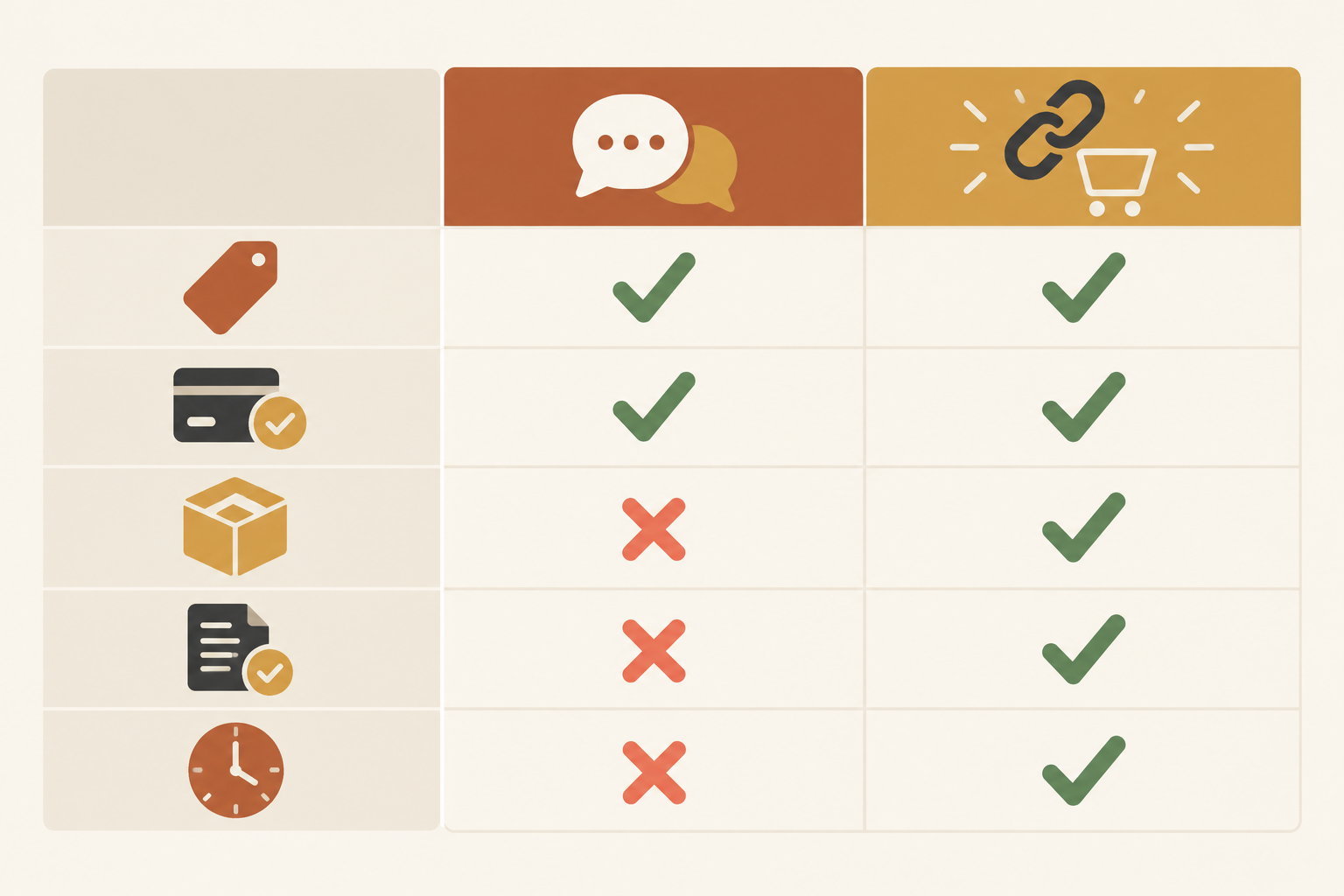
The idea is simple. A link-in-bio page works as a mini store: your customer taps, browses, chooses and pays in one flow. You still chat, but the chat no longer carries the transaction. A customer who finds you after hours can browse current prices and place an order without waiting for a reply; you can follow up in chat afterward.
| Taking orders in DMs | Sending a shop link | |
|---|---|---|
| Price enquiries | Typed out again and again | Prices are on the page, so one link answers it |
| Payment confirmation | Screenshots, refreshing your banking app | Order shows as paid once the payment is processed |
| Stock | Tracked in your head or a notes app | Customers see availability, if you keep stock counts updated |
| Order records | Scattered across chats | One list of orders and customer details |
| Time per sale | Many messages back and forth | A short reply and a link |
It isn't only for physical products. On a Shopstar page you can list baked goods, clothing, candles and skincare, plus digital downloads, service bookings through the built-in booking system, event tickets, and memberships or subscriptions. It all runs through one checkout, and payments are handled through Shopstar Go (card, Apple Pay and Scan to Pay). Check Shopstar's current feature pages to confirm what's included on your plan.
I like to think of it as a small tool that sits next to your chats. It doesn't replace your personality. It just takes over the boring bits.
What to look for in a shop-link tool
Whether you choose Shopstar or something else, ask these questions before committing:
- Does it accept the payment methods your customers already use?
- Are fees shown in rand, including any monthly fee and anything that isn't included?
- How quickly do payouts reach your South African bank account?
- Can it handle your product type, whether that's stock, bookings, tickets or downloads?
- Can you export your order records for your accountant?
How to set up a shop page to share in chats
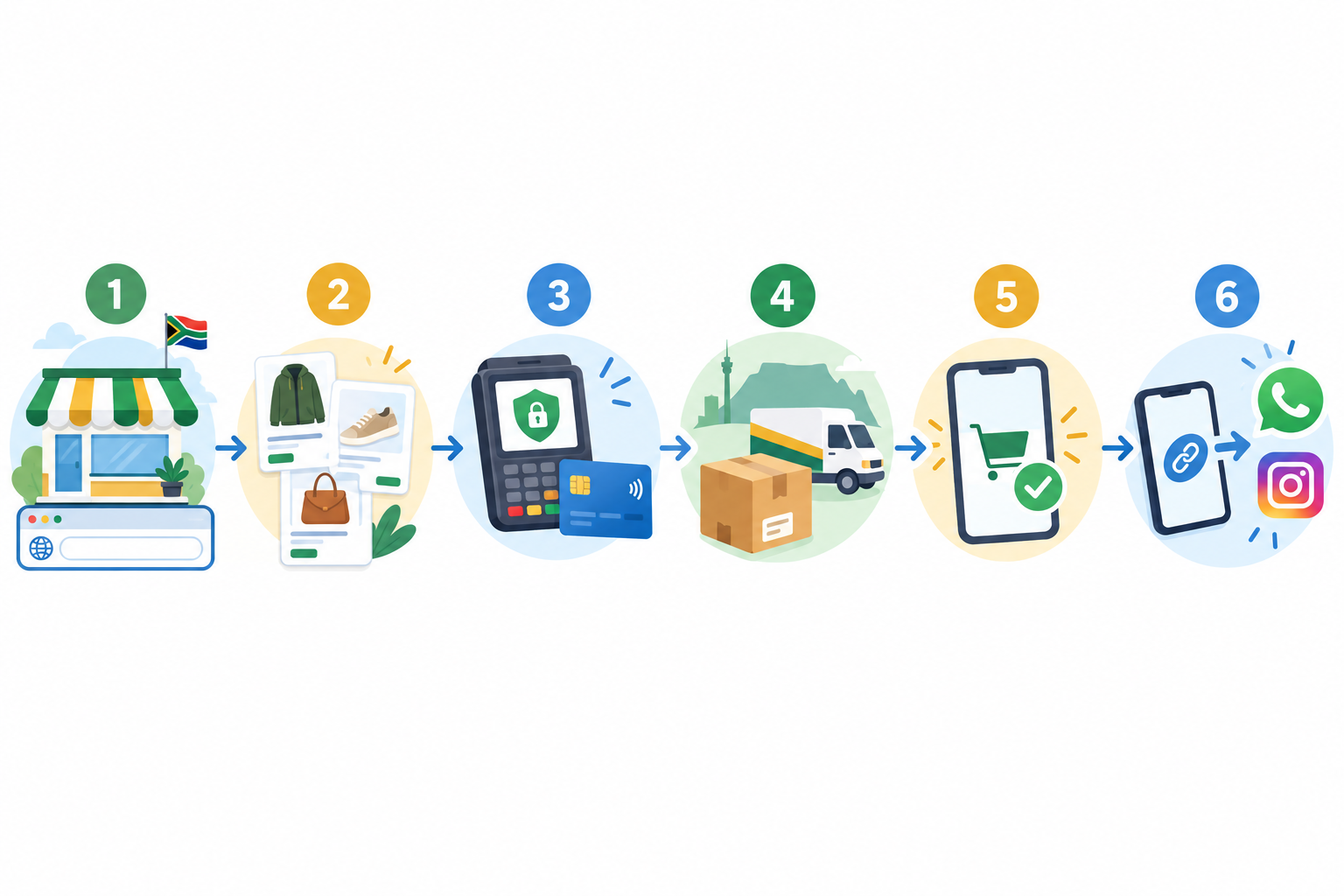
You don't need to be technical. For a simple store with a handful of products, you can often get a first version live in an afternoon. A bigger catalogue or complicated delivery rules will take longer. Here's the path:
- Sign up and claim your link. Choose a custom shopstar.page URL, or connect your own domain if you have one.
- Add your first products or services. Use clear photos, honest descriptions and prices in rand. If you're VAT registered, show VAT-inclusive prices (VAT in South Africa is 15%).
- Set up delivery that fits how you work. That might be a courier to Cape Town, Joburg or Durban, local collection, or in-person appointments.
- Switch on payments. Turn on Shopstar Go and add your South African bank account for payouts.
- Add the legal basics: your business name, contact details and a clear returns and refund policy (more on that below).
- Place a test order yourself. Then share the link with one friendly customer and ask what felt confusing.
If you get stuck, Shopstar offers hands-on onboarding support, and its AI-powered tools can help with managing products, orders and customer data once you're live.
What it costs to sell through WhatsApp and Instagram: a fee example 💰
'How much will this cost me?' is always the first question, so let's do the sums. Shopstar has two plans:
- Start Free has no monthly fee and charges 6% all-in per sale (a 2.9% payment gateway fee plus a 3.1% Shopstar fee).
- Lower Fees has a monthly fee, plus 2.9% per sale.
Here's a worked example on a R500 order:
| Start Free | Lower Fees | |
|---|---|---|
| Per-sale fees | R30 (6%) | R14.50 (2.9%) |
| You receive | R470 | R485.50, less your monthly fee |
| Monthly fee | R0 | See the current pricing page |
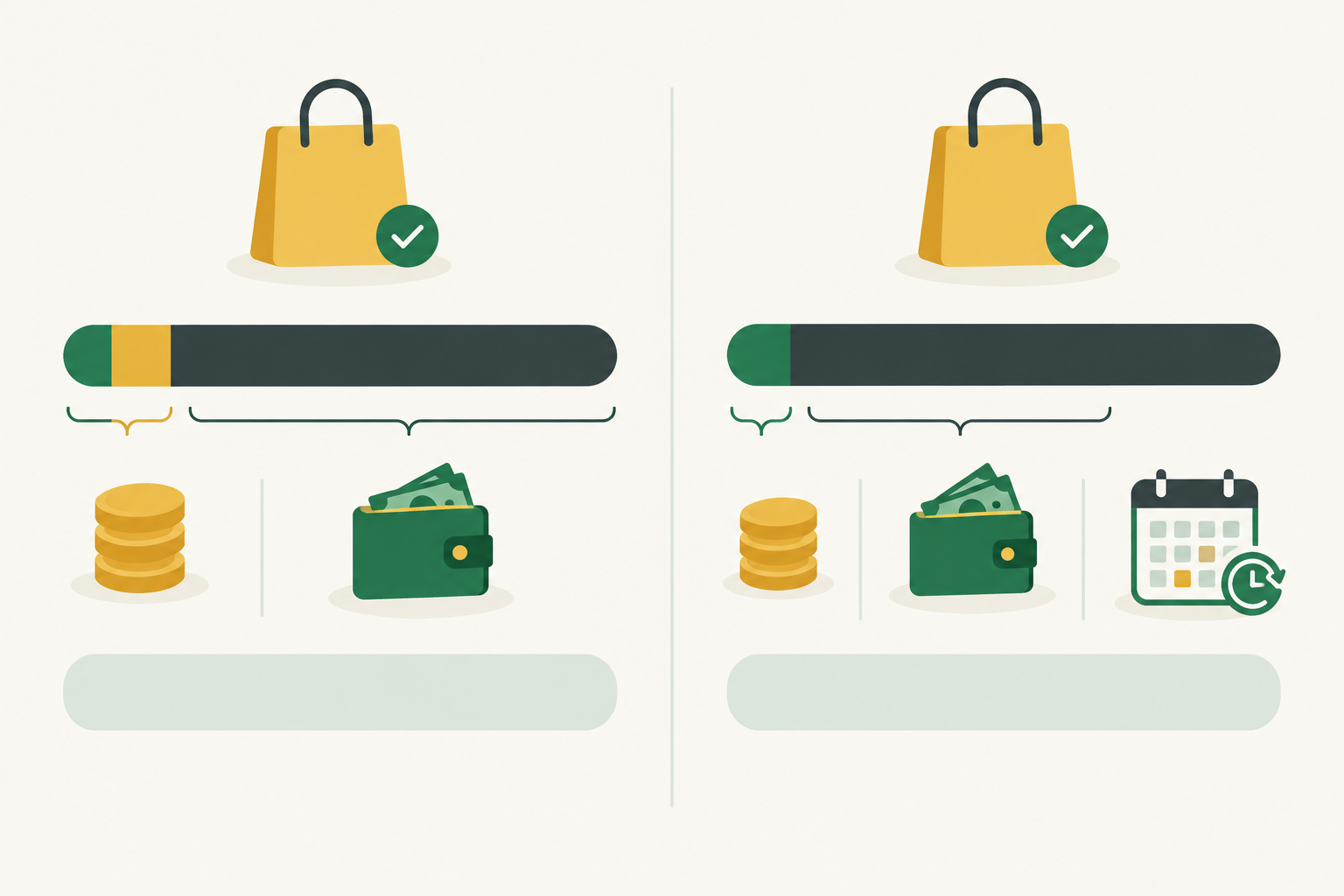
The Lower Fees plan saves you R15.50 on every R500 order, which is 3.1% of the order value. To find your break-even point, use this formula:
Monthly fee ÷ 0.031 = the monthly sales you need before Lower Fees pays for itself.
For illustration only, if the monthly fee were R200, you'd break even at about R6,452 in monthly sales, or roughly 13 orders of R500. Grab the actual monthly fee from the pricing page, then plug in your own numbers. Fees were correct when this was written, so check the page for any changes and for any other charges or exclusions.
My rule of thumb is to start free while you test demand, then compare the plans once your monthly sales are steady. It's also worth weighing fees against what DM selling already costs you in chasing payments and unanswered messages. Those costs just don't show up on a statement. Delivery, packaging and advertising still need budgeting separately.
Where to put your shop link on Instagram and WhatsApp
A link nobody sees won't sell anything. Platform features change, so check the Instagram Help Centre and WhatsApp Business pages if a setting looks different on your phone.
Where to put your shop link on Instagram
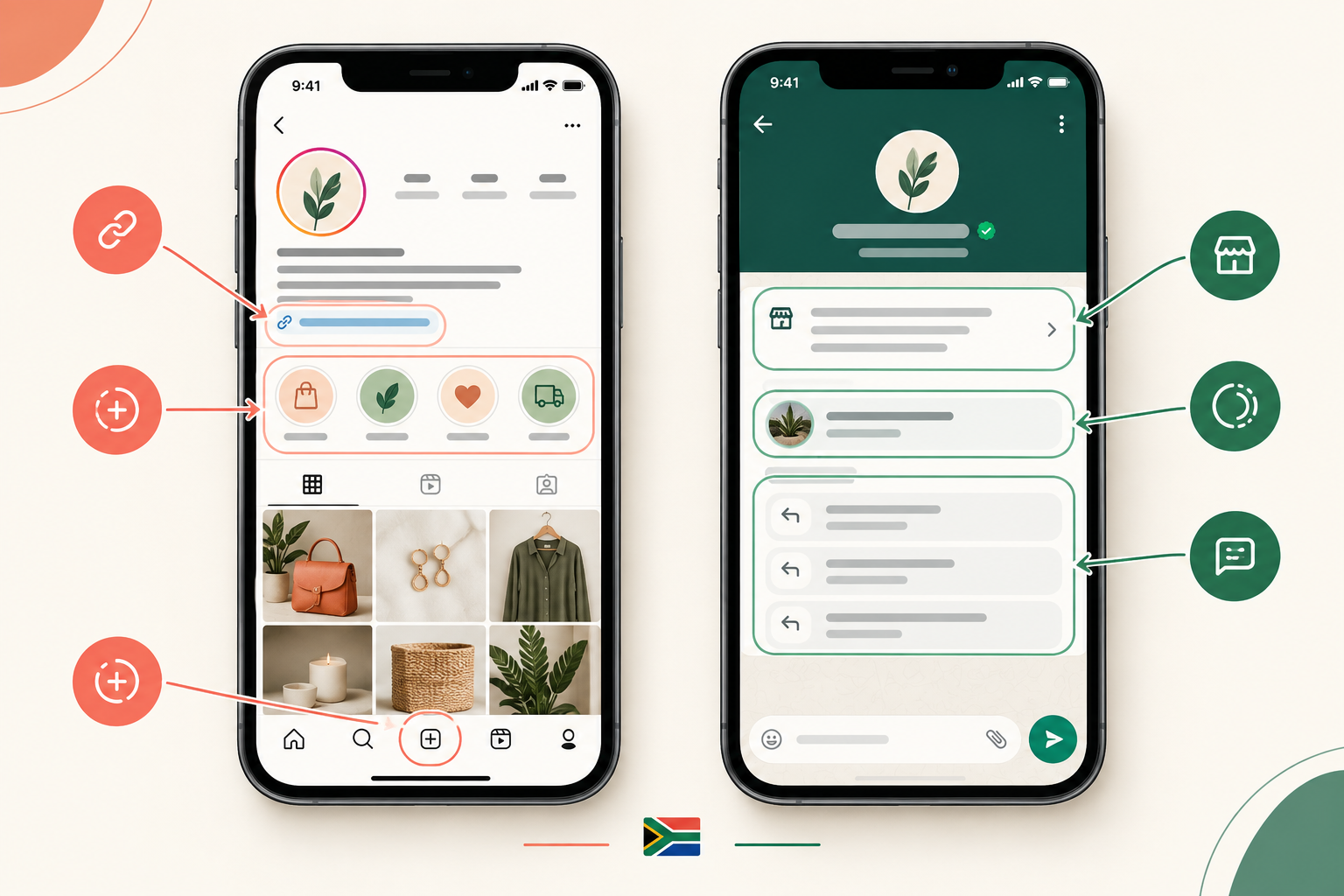
- Your bio. Instagram has allowed up to five links in a bio, so put your shop link first. Use a clear call to action like 'Order here 👇' rather than a vague 'link in bio'.
- Stories. Add the link sticker to product reveals, restocks and behind-the-scenes posts.
- Highlights. Create 'How to order', 'Delivery' and 'Reviews' highlights that point people back to your link.
- Captions and pinned posts. Links in captions aren't clickable, so tell people exactly what to do: 'Tap the link in my bio, pick your items and pay securely.'
- Saved replies or auto-responses. Send your shop link the moment someone DMs 'price?'.
Where to put your shop link on WhatsApp
- Your WhatsApp Business profile. Add the link to the business description and website field.
- Catalogue and status. Share the link in status updates and alongside product photos.
- Quick replies. Save a short message with your link so you can send it in two taps.
- Broadcast lists or channels. Send restock alerts with a direct link, but only to people who have opted in, in line with POPIA.
Share your link offline, too
Add your link or a QR code to packaging, invoices, business cards and stall signs. If you trade at markets like Neighbourgoods Market in Johannesburg or the Oranjezicht City Farm Market in Cape Town, a QR code at your stall lets customers order or pre-order on the spot.
One tip: tell people what happens next. 'Tap, choose, pay, and I'll message you when it ships' removes hesitation faster than any clever caption.
How to reply to enquiries with a link instead of a quote
This is where the shift shows up in your day.
Before: a long message listing every flavour, size, price and delivery option, followed by banking details, followed by waiting.
After: 'Hi Naledi! 😊 Yes, the red velvet is available. You can see sizes and prices and order here: [your link]. Shout if you need help choosing!'
It's a warm greeting, one line answering the question, and the link. Here are three templates to save as quick replies:
- Price enquiry: 'Hi! Thanks for getting in touch 😊 All my prices are here, and you can order and pay securely in a minute: [link]'
- Is this still available? 'Good news, you can see what's in stock right now here: [link]. If it's on the page, it's yours to order!'
- Can I book for Saturday? 'Absolutely! You can see my open slots and book here: [link]. Pick a time that suits you and pay your deposit at checkout.'
Special requests can still start in chat. For a custom order or bulk quote, agree the details with the customer, then add the agreed price as an item or booking they can pay for. A hairstylist in Sandton or a photographer in Cape Town can do the same with deposits, which cuts back-and-forth and no-shows.
One reminder: a link doesn't excuse silence. Aim to reply to messages the same day.
Can you keep the personal touch when you sell online? 🤝
The most common worry I hear is, 'Won't a checkout link make my business feel cold?' Not if you split the work sensibly. Chat is where the relationship happens, and the link handles the transaction.
- Use DMs for the human bits: advice on sizes, flavours or packages, a quick voice note, a thank-you after delivery.
- Add a personal note to every order, like a handwritten card or a friendly WhatsApp message when the parcel ships.
- Share order updates before anyone asks, so customers don't have to wonder 'where is my order?'
- Keep your voice consistent across your bio, shop page and replies.
Picture a candle maker in Stellenbosch who keeps chatting with customers about scents and gift ideas, but moves checkout to a link. Her evenings go to pouring candles instead of reconciling EFTs, and her customers still get the same warm replies. That's the trade you're after.
Staying safe and legal when you take payments online
A secure checkout is a big step up from screenshots. A processed payment is recorded by the payment system itself, so you're not relying on an image a customer sent. It isn't risk-free though. Card payments can still be disputed, reversed or charged back, so keep clear order records, communicate delivery details and respond quickly to any query. Never ask customers for card PINs or one-time passwords in chat.
Here's a plain-English rundown of the South African rules. This is general information, not legal advice, and the details can depend on your business and the transaction.
- ECTA (Electronic Communications and Transactions Act): for covered online sales, you need to disclose your business identity and contact details, what you're selling, the price, payment arrangements, delivery terms and your returns policy. ECTA also gives buyers a seven-day cancellation right on certain electronic transactions, with exclusions, so it isn't a blanket return right.
- CPA (Consumer Protection Act): describe your goods honestly, price them clearly, and handle faulty goods fairly. The CPA also has a five-business-day cooling-off right for certain direct marketing transactions, which is separate from ECTA. Whether either applies depends on how the sale happened.
- POPIA (Protection of Personal Information Act): only collect the customer details you need to fulfil the order, keep them safe, and get consent before adding people to marketing lists. Names, phone numbers and addresses in your chats count as personal information.
- SARS: your sales count as income. At the time of writing, VAT registration is compulsory once taxable turnover passes R1 million in any 12-month period, and voluntary from R50,000. If you're registered, VAT is 15% and should be included in your displayed prices. Digital order records make tax time far easier.
Thresholds and rules change, so check the current position with SARS or a registered accountant for your situation.
Your first-week action plan for selling on WhatsApp and Instagram
You don't need to do everything at once. Here's a simple seven-day plan:
- Day 1: Set up your Shopstar page and add your top five products or services.
- Day 2: Make a test purchase and fix anything confusing.
- Day 3: Update your Instagram bio and WhatsApp Business profile with your link.
- Day 4: Save your quick replies and Instagram auto-response with the link.
- Day 5: Post a Story and a WhatsApp status showing how to order.
- Day 6: Message past customers personally and tell them about the new way to order.
- Day 7: Review what worked, check your first payouts and adjust.
By the end of the week, your DMs should feel more like conversations and less like a queue. If you'd like to try it, you can start free and claim your shopstar.page link. At the time of writing, Shopstar reports a 4.9-star Google rating and more than R250 million in paid orders processed through its stores.
Frequently asked questions about selling on WhatsApp and Instagram
Can I still chat with customers if I use a checkout link?
Yes. The link takes over price lists, stock checks and payment, so your chats can focus on advice and custom requests.
How do I stop fake proof-of-payment problems?
Move payment out of the chat and into a secure checkout, and treat an order as paid only when the checkout shows it. That takes screenshots out of the process, though disputes and reversals can still happen on card payments, as covered above.
Where do I put my link on Instagram?
Start with your bio, then add Story link stickers, highlights like 'How to order', and saved or automatic replies. On WhatsApp Business, add it to your profile and a quick reply.
Is it safe to take payments online?
It's safer than sharing banking details in chats, provided you use a reputable checkout, show clear terms and contact details (ECTA and CPA) and handle customer information responsibly (POPIA).
When does the Lower Fees plan make sense?
When your monthly sales are above your monthly fee divided by 0.031. See the break-even example in the fees section and check the current pricing page.
Do I need to charge VAT on my WhatsApp and Instagram sales?
Only if you're registered for VAT. Registration is compulsory above R1 million in taxable turnover over 12 months and voluntary from R50,000. If you're registered, VAT is 15% and should be included in your displayed prices. Confirm the details with SARS or an accountant.