How to Keep Selling Online During Load Shedding in South Africa: A Practical Guide for Small Shops and Studios
Keep selling online during load shedding in South Africa with an always-open store page, phone-based order management, clear customer updates and affordable backup power.
13 min read

On this page
How to Keep Selling Online During Load Shedding in South Africa
Yes, you can keep taking orders when the lights go out. Move your selling onto an online store page that's hosted away from your premises, so customers can order, book and pay even when your shop or studio is dark. Add phone-based order management, a simple outage schedule and a small backup power kit (a power bank and a UPS for your router), and load shedding becomes an inconvenience instead of a lost day of trade.
I'll be upfront: nothing makes load shedding vanish, and schedules change. But you can shrink the damage a lot. Here's how small shops and studios across South Africa can keep selling online during load shedding without a full website, a big budget or technical skills.
A quick disclosure: I work at Shopstar, so I use our store builder as the worked example below. The steps apply to any platform you choose, and I've flagged where you should check current details yourself.
The cost of closed doors during load shedding
Picture a hair studio in Joburg. The dryers go quiet, the card machine drops offline, and the booking diary on the desktop is out of reach. Or a Cape Town bakery where the ovens stop mid-batch and the phone keeps buzzing with orders nobody can answer. Depending on your stage and area, a single outage can run two to four hours or more, and some days you get more than one.
Let's do some simple maths. If you lose four hours a day and your shop normally makes R250 an hour in sales, that's R1,000 a day. Over 20 trading days, it's roughly R20,000 a month. That's gross sales, not profit. Your real loss is the margin on those sales, plus the costs you still carry. Your own numbers will differ, so it's worth writing them down.
Here's the same R250-an-hour example at three illustrative levels. These hours are assumptions for the sake of the maths, not official figures, and outage lengths vary by area and schedule:
| Illustrative scenario | Hours lost per day | Sales lost per day | Sales lost over 20 trading days |
|---|---|---|---|
| Lighter (e.g. Stage 2-type days) | 2 | R500 | R10,000 |
| Moderate (e.g. Stage 4-type days) | 4 | R1,000 | R20,000 |
| Heavy (e.g. Stage 6-type days) | 6 | R1,500 | R30,000 |
Sales are only part of it. There are quieter costs too:
- Missed enquiries: a customer messages, hears nothing for hours and tries someone else.
- Lost loyalty: people rarely wait around when a competitor answers quickly.
- Spoiled stock, whether that's cold-chain items, fresh bakes or anything temperature-sensitive.
- Idle staff time, because you're still paying wages while the lights are off.
- Rescheduling headaches: every cancelled appointment means extra admin later.
For context, the CSIR reported load shedding on 335 days in 2023, with around 6,947 GWh of energy shed, up from 3,773 GWh in 2022. That's a national figure, not a measure of what any single shop lost, but it's a good reason to plan instead of hope.
Here's the mindset shift I'd make: your shop may close, but your order-taking doesn't have to. Taking an order and fulfilling it are different jobs. An online page helps with the first, and the rest of this guide helps with the second.
Let customers buy online when your shop is closed 🛒
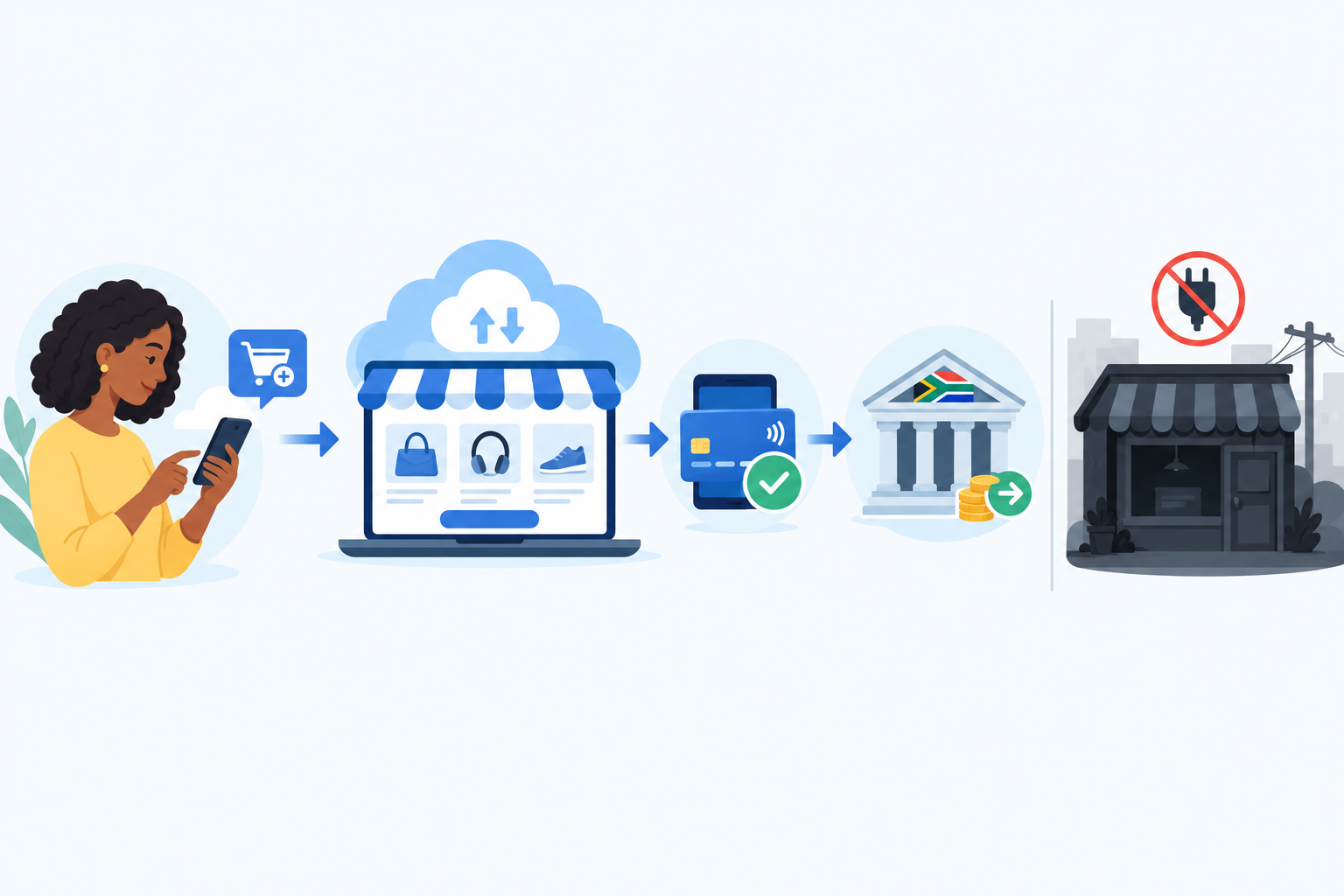
Can customers still order when my shop is closed? Yes, in most cases. An online store page lives on servers away from your premises, so a power cut at your shop doesn't take it offline. Customers can browse, order, book and pay while your till is dark.
There are limits, and they matter. Your customer needs power and a signal on their side. You may not see a notification until your phone has signal or your router is back up. And an order you can't pack or deliver is still a problem. So think of the page as a way to capture demand, then use the next sections to make sure you can honour it.
This is where a link-in-bio approach works well. Instead of building a full website, you set up one simple page that holds your products, services and checkout, then point people to it from Instagram, WhatsApp and TikTok.
One example: how online selling works on Shopstar
Shopstar's online store builder is made for sellers who want to get live quickly. Based on our current setup, a single checkout can handle:
- Physical products, such as boutique stock or home bakes
- Digital downloads like recipe books, workout plans or templates, which can be delivered automatically
- Service bookings and appointments, through a built-in booking system
- Event tickets for workshops, markets and classes
- Memberships and subscriptions, if you want recurring income
You can claim a custom shopstar.page URL or connect your own domain. Features, payment methods and pricing can change, so confirm the current list on the Shopstar website before you decide. If you're comparing platforms, ask each one the same questions: what can I sell, how do I get paid, and what does it cost?
Getting paid online without a powered card machine
Online payments are processed away from your premises, so your outage doesn't stop a customer paying. On Shopstar, payment processing runs through Shopstar Go, and payouts go into your South African bank account on an automatic schedule. Two things to keep in mind:
- Payment and payout aren't the same thing. A customer can pay instantly, but the money reaches your bank after settlement. Bank processing, weekends and public holidays can all affect timing, so check the current payout terms instead of assuming same-day access to funds.
- Check which payment methods are available (for example cards, Apple Pay or Scan to Pay) in your own dashboard.
What it costs to sell online, in rand
At the time of writing, Shopstar has two plans, and I'd rather show you the maths than be vague. Please confirm current pricing on the website:
- Start Free has no monthly fee and costs 6% all-in per sale (a 2.9% payment gateway fee plus a 3.1% Shopstar fee). On a R500 order, that's R30 in total.
- Lower Fees has a monthly fee and costs 2.9% per sale. On a R500 order, that's R14.50, plus the monthly fee.
A rough rule of thumb: if you're just starting or your sales are modest, a no-monthly-fee plan keeps your risk low. As volumes grow, a lower per-sale rate can start to outweigh a monthly fee, and I'll show a worked example near the end.
How to manage online orders from your phone during load shedding 📱
How do I manage orders from my phone? You don't need a desktop or a working shop till. Most of the admin can run from a charged smartphone. Here's the routine I'd set up:
- Turn on notifications. Make sure new orders and bookings reach your phone straight away, so you spot them the moment you have signal.
- Use your phone as your control room. You can view, confirm and update orders, products and customer details from the app or browser.
- Keep a power bank and spare cable within reach. Put them in your bag or at the till, charged and ready, before the schedule says the lights go off.
- Have mobile data as your fallback. When Wi-Fi drops, switch to data or use your phone as a hotspot. This only works if you have an active data bundle or airtime, and a network that's still up. Bundle prices vary by network, so check current rates, and test tethering before you need it.
- Pack in batches. Once power returns (or in daylight), prepare orders in one go instead of dashing around between outages.
If you also use WhatsApp Business for enquiries, labels such as 'new', 'awaiting payment', 'paid' and 'ready for collection' make it hard to lose track of anyone. One firm rule: never mark an order as paid because a customer sent a screenshot. Check the payment in your dashboard first.
A quick word on POPIA. Customer names, numbers and addresses are personal information. Use a screen lock, keep your phone secure and don't forward customer details casually. It's a small habit, and it protects you and your customers.
What you can and can't do during a power outage
Here's a realistic example. Your studio loses power from 10:00 to 12:30.
- Still possible: customers book and pay online, you check new orders on your phone (if you have data), you reply to WhatsApp messages and you send delay notices.
- Not possible: running equipment that needs mains power, like dryers, ovens or a PC, and packing in the dark without lighting.
- Catch up later: confirm bookings in bulk, pack orders and send tracking details once power returns.
Seeing it this way takes the pressure off. You're not trying to run everything. You're trying to keep demand flowing and communication clear.
Scheduling bookings, pickups and deliveries around load shedding
An online page works best when what it offers matches what you can actually deliver. Here's how to line things up with the load shedding schedule.
- Studios and service providers: use your booking system to set availability around the schedule for your area. Check Eskom or your municipality (for example the City of Cape Town or City Power in Johannesburg), because supply areas differ. Customers then only see slots that work.
- Everyone: build in buffer time. Surprise changes happen, and a gap before and after likely outages stops one delay from turning into a pile-up of missed appointments.
- Product sellers: set collection and delivery windows that avoid known outage blocks, and batch courier drop-offs. Avoid promising exact arrival times, since windows are safer. A collection point such as Pargo can also take pressure off timing.
- Event organisers: tell attendees early what the plan is if the venue loses power, whether that's a backup venue, a delayed start or a reschedule.
- Memberships: include digital content, like recorded classes or downloadable guides, that members can access at any time.
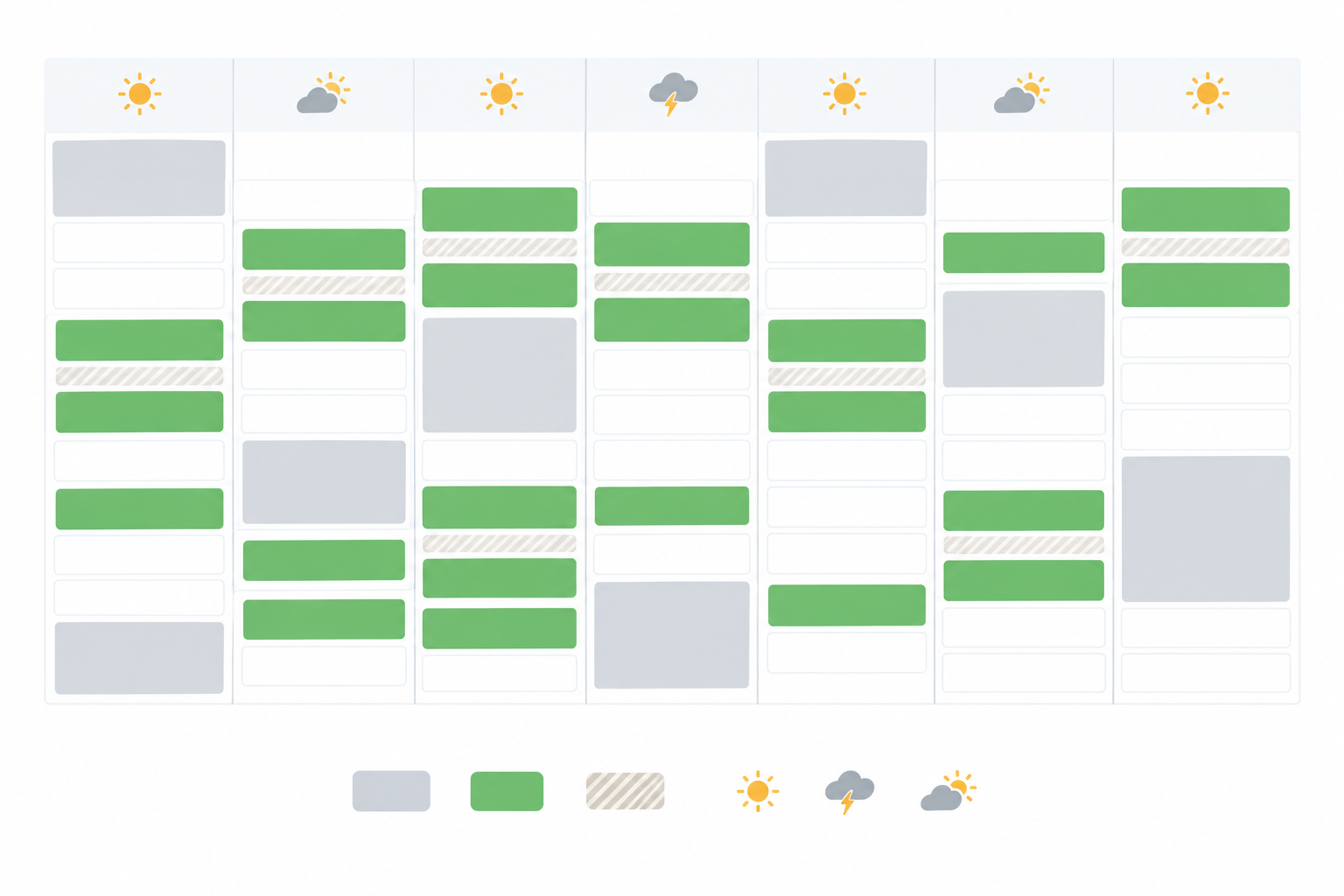
Here's what a sample week might look like for a small studio:
| Day | Outage block (example) | Bookings offered |
|---|---|---|
| Monday | 10:00 to 12:30 | 08:00, 13:30, 15:00 |
| Tuesday | 18:00 to 20:30 | 09:00, 11:00, 14:00 |
| Wednesday | 14:00 to 16:30 | 08:00, 10:00, 17:00 |
| Thursday | 06:00 to 08:30 | 10:00, 12:00, 15:00 |
| Friday | 12:00 to 14:30 | 09:00, 10:30, 15:30 |
These times are illustrative only. Always use your own area's published schedule.
My tip: check the schedule once a week and update your availability at the start of each week, instead of reacting every day. Apps like EskomSePush can send alerts when something changes, but verify important changes with your utility or municipality.
How to communicate clearly with customers about delays
How do I update customers about delays? Be proactive, short and specific. Say what's delayed, give a new realistic time window and tell them how they'll hear next.
Set expectations before a power outage
Put a short note at the top of your page or in your bio, such as: 'Orders placed during load shedding ship the next working day.' Back it up with Instagram stories, WhatsApp Business status updates and your order confirmation messages. WhatsApp Business also has greeting and away messages that work while you're offline.
Copy-and-paste customer message templates
Delayed order: 'Hi [Name], thanks for your order! Load shedding has delayed our packing today. We now expect to dispatch by [date]. We'll message you as soon as it's on its way. If you'd rather cancel, just reply and we'll sort it out.'
Rescheduled booking: 'Hi [Name], a power cut is affecting our studio at your booked time on [date]. Could we move you to [option 1] or [option 2]? Reply with what suits you best. Sorry for the hassle!'
Collection time change: 'Hi [Name], your order is ready, but outages in our area mean we'd like to adjust collection. We're available between [time] and [time] on [date]. Does that work?'
Your legal footing, in plain language
This isn't legal advice, but a few basics are worth knowing:
- The Consumer Protection Act (CPA) expects fair dealing and honest communication. You should deliver within agreed timeframes or tell customers fairly when you can't.
- The Electronic Communications and Transactions Act (ECTA) sets out the information online sellers must provide. Section 43 provides for delivery within 30 days of payment unless you agree otherwise, with cancellation and refund remedies if a supplier doesn't perform. It also gives cooling-off rights for many online purchases, though some services and bookings are treated differently.
The safest approach is simple. Keep your delivery and refund policy visible and honest, and don't over-promise. In my experience, customers forgive delays far more readily when they hear from you early.
Low-cost backup power to stay online during load shedding 🔋
Is there a low-cost way to stay online? Yes. You don't need a full inverter system to protect the basics. Protect your phone and your router first, and you can keep checking orders and answering customers.
The prices below are rough estimates, so confirm them with retailers before buying.
| Option | Approx. price | What it protects | Best for |
|---|---|---|---|
| Power bank for phone | R300 to R800 | Phone, hotspot | Every seller, first purchase |
| Mini UPS for Wi-Fi router | R500 to R1,500 | Router, and sometimes the fibre box (the ONT) | Keeping Wi-Fi alive |
| Rechargeable LED lights | R150 to R500 | Lighting | Safe packing and customer service |
| Portable power station | R5,000 to R15,000+ | Phone, router, laptop, card machine, lighting | Studios with several devices |
| Small inverter and battery setup | Quote needed | Wider shop circuits | Established shops with bigger needs |
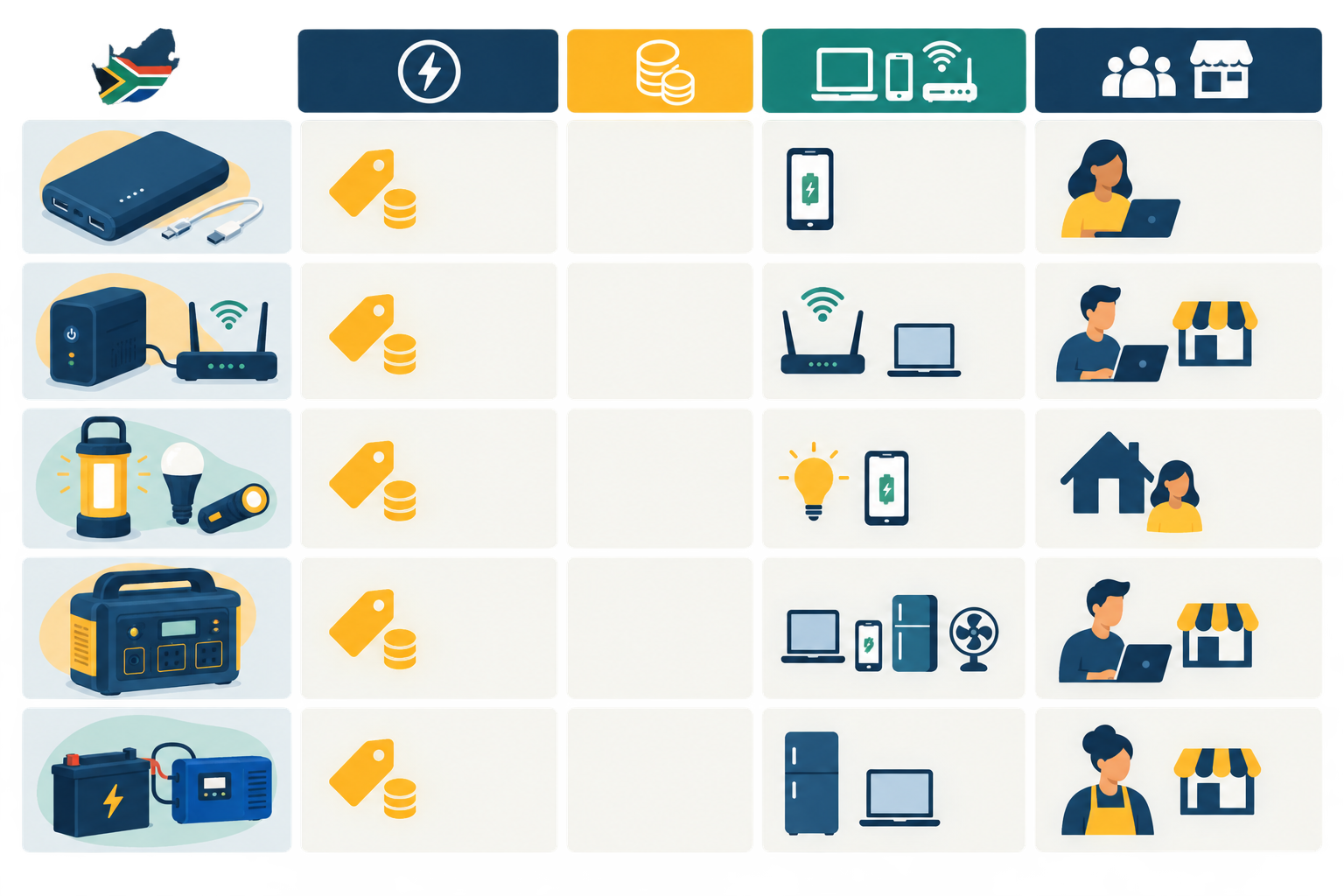
My advice is to start with the cheapest fixes, a power bank and a router UPS, then upgrade as your budget allows. Before buying a mini DC UPS, check your router's voltage, current, connector and polarity so you don't fry anything.
Mobile data is a handy fallback if you have an active bundle or airtime. Test your phone's hotspot, find out which network has the best signal at your premises, and consider keeping a spare SIM from a different network. Cell towers can lose power during long outages too, so don't rely on one option alone. And none of it helps if the phone is flat, so charge everything before an outage.
A note on money matters
Keep receipts for backup equipment, chat to your accountant about what may be claimable, and keep your records in line with SARS requirements.
On VAT, the rate in South Africa is 15%. Registration is generally compulsory when your taxable supplies exceed R1 million in a consecutive 12-month period, and voluntary registration is possible below that if you meet SARS conditions. Taxable supplies aren't always the same as total turnover, so check current SARS guidance or ask your accountant what applies to your business. It's better to plan your pricing early than scramble later.
A simple load shedding action plan for online sellers
You can get most of this done in an afternoon. Here's the plan, whichever platform you use:
- Choose a store builder you'll actually maintain. Pick something you can set up without coding, and compare fees, payment methods and payout terms.
- List your top sellers. Add your best products, services or tickets with clear photos, honest descriptions and prices in rand.
- Turn on payments. Enable the payment methods you want and link your South African bank account. Check how long payouts take.
- Share your link everywhere, including your Instagram bio, WhatsApp profile and Google Business profile.
- Set your windows and your notice. Add availability, delivery or collection windows, and a short line about load shedding.
- Test everything. Charge your power bank, test your data fallback and place a test order yourself.
If you're not a tech person, look for a platform with onboarding and support, and ask what's included before you sign up.
Choosing between a no-monthly-fee plan and a lower-fee plan
Here's a simple way to decide, using Shopstar's current structure of 6% all-in versus 2.9% plus a monthly fee. The gap is 3.1 percentage points. To find your break-even point, divide the monthly fee by 0.031. As a hypothetical, if a monthly fee were R300, you'd need about R9,700 in monthly sales before the lower per-sale rate saves you money (R300 ÷ 0.031). Plug in the actual monthly fee from the pricing page, and compare it with your real sales.
Load shedding is frustrating. But with a charged phone, a backup for your router and a bit of planning, you can keep your customers in the loop and your orders coming in.
Frequently asked questions about selling online during load shedding
Can customers still order when my shop is closed because of load shedding?
Usually, yes. Your online page is hosted away from your premises, so a power cut at your shop doesn't switch it off. The catch is that customers need power and signal on their side, and you may not see orders until your phone or router is back online.
Do I need a full website to sell online during load shedding?
No. A simple store page or link-in-bio page can take orders, bookings, ticket sales and payments from one checkout. It's usually faster and more affordable than building and maintaining a full website.
What happens to online payments if my power is out?
Online payments are processed away from your premises, so your outage doesn't stop customers paying. What lands in your bank account depends on your payment provider's settlement schedule, which weekends, public holidays and bank processing can all affect. Check the payout terms of whichever platform you use.
What should I tell customers when an order is delayed?
Tell them what's happened, give a new realistic timeframe and offer options if they'd prefer to cancel or reschedule. The Consumer Protection Act expects fair dealing and honest communication, and a short, friendly message early on usually keeps customers on your side.
What's the cheapest backup power setup for an online seller?
Start with a power bank for your phone and a small UPS for your Wi-Fi router, which together cost roughly R800 to R2,300 depending on brand and capacity. Add mobile data as a fallback if you have an active bundle. Once you see how much trade you're protecting, you can think about bigger solutions like a portable power station.